How to set up your listing, your website and your menu so someone searching where to eat can see what you serve, which street you are on, and how to book.
This guide is for owners and managers of restaurants, bars and cafés who want to be found when someone searches for somewhere to eat, and who would rather understand the work before handing it over. You do not need to read it in one sitting. The useful way is to open your Google listing on your phone and your website on a computer, and tick things off as you go.
Nobody can sell you the top spot or a place on the map. Google does not charge for extra crawling or for a higher position, and distance does a lot of the work: two streets from a similar venue, that other place may show first. What you can fix this week is making the listing, the website and the door say the same thing, so a person can book without guessing.
For a page to be able to show in Google, three things have to happen, and any one of them can fail without you noticing. First, Google has to find the address. It finds addresses by following links from pages it already knows, and from a sitemap, which is a list of the addresses you care about. There is no registry where you sign the venue up and that is the end of it. If the menu is not linked from the homepage and it is not on that list either, it is easy for nobody to reach it.
Then Google has to be able to read the words. It fetches the page, draws it in a recent browser and runs the JavaScript. Anything that lives only inside a photo, a scanned PDF or a banner sitting on top of the menu does not always become text. Last, it has to decide whether the page answers what the person searched for, and whether it is allowed to show it. A page can be read and still not shown. The usual reasons are that the text does not answer the search, the page is thin, or you have asked for it not to be shown.
That last case is a tag on the page itself, noindex, and it belongs on the “thanks for booking” screen or on a draft. Blocking the address in robots.txt does not hide it: that only stops the visit, and the address can still appear. Do not block the CSS, the JavaScript or the photos the page needs in order to display. The site should open on https and be readable on a phone, because Google looks at it as a mobile visitor. Whoever has Search Console can check whether that read was possible. Sending the address in by hand does not replace a real link from the homepage, and getting this in order does not promise you will show up on Tuesday.
2. The listing: category, the name on the door, and today’s hours
The listing is your Google Business Profile, the one you edit in the app or on the business site. Open it while you are standing in the venue. The primary category is the choice that most confuses someone searching: pick the most specific one that is true. If you are a pizzeria, the category is pizzeria. If you are a café, café. Plain “restaurant” drops you in the generic drawer. Extra categories, a few of them, only if they are also true. One Thursday burger does not make you a burger restaurant, and a long list of things you once served makes the listing messy.
The name is the name on the sign and on the invoices. If the venue is called Fame, the listing is called Fame, and if the door already says what kind of place it is, that can sit with the name. What does not belong in the name is a tail of extra words meant to show up in more searches. Google can correct that name or put the listing under review. The address is the door, written out in full. The phone is the one the shift actually answers, ideally a local number. The website link opens the page where the street, the hours and the booking are visible, not a row of buttons if you already have your own site. Finish the verification Google asks you for. A “verified” badge bought from someone else is not that verification.
Fill in the hours day by day, with the bank holiday and the long weekend loaded before they arrive. If someone filters for “open now” and the hours are wrong, you either drop out or you appear with the shutter down, and the next day’s review will say so. The manager who closes is the person who changes those hours the same day the service changes. The description fits in 750 characters: what you serve, which street, and one detail that is only yours. If Google offers you an automatic description, read it aloud before you publish it, because it often invents dishes. Put the menu link and the booking link on the listing. Attributes (terrace, takeaway, booking, access) are filters so a person can narrow the search. One post a week, with Friday’s menu or the holiday closure, helps the person who opens the profile. It is not a button that moves you up.
If the name, the listing logo and the website do not look like the same venue, Cristina and Carlota can sort that through branding and visual identity. We have spent years doing this for hospitality, and we will send a no-commitment quote.
A Botequim post. The sign, the listing and the website should be recognisable as the same place.
3. The same name, the same street and the same phone number
Search the venue’s name on Maps before you change anything. If two pins sit on the same door, keep the one with the reviews and the right address, and ask Google to merge or remove the other. Two listings at the same address get in each other’s way. The name, the street and the phone on the listing have to match, letter for letter, the website footer, the Instagram bio and the card you leave on the table. “St” in one place and “Street” in another, or an old number nobody answers, is a needless way to lose a booking.
When you move or change the number, update every place in the same week. If the website address changes too, whoever looks after the site sets a permanent redirect from the old URL to the new one. A short move, a month of building work, can be a temporary redirect. A page that says it cannot find anything, while still answering as if it exists, leaves guests and Google unsure which address is the real one. Pick a single main address: with or without www, on https, with or without the trailing slash. The others should send people there.
If you have the menu in English for people visiting from elsewhere, the two pages point at each other with hreflang, each one states its language, and the Spanish page uses lang="es". A venue with one dining room does not need a service area of twenty towns. The venue address is the fact. A service area is for someone who delivers or caters away from the room, and even then every town you name has to be a place you actually go.
4. One page for each dining room
One dining room needs only a few pages, and each one has a job: the homepage says who you are, where you are and how to book; the menu lists the dishes; a how-to-find-us page repeats the street, how to get there and whether there is a terrace. Google groups pages that say the same thing and shows one of them. The others sit as alternates. That is not a fine. It means you stop knowing which one will appear, and the guest does not know which one to trust.
A second address, with its own hours and its own menu, does deserve its own page and its own listing. What does not deserve a page is every neighbourhood, or every way of asking the same question. “Pizzeria in Alcalá”, “pizzeria in Getafe” and “pizzeria near me”, with the same paragraph and the town swapped in, help nobody if you have no door there. Turning out many pages like that, by hand or with a chat, just to catch searches, is scaled content. Google can treat it as abuse. The address of the page should also make sense: /menu says what is inside. An opaque code helps neither the person nor the breadcrumb in the result.
You also do not need a new page every time the wording of a search changes. The systems can tell that “where to eat pizza” and “pizzeria” may lead to the same menu, if that menu is written properly. Publishing more URLs to look busy, or changing the date on a page you have not touched, does not improve the venue. The sitemap lists the homepage, the menu and how to find you. It does not limit crawling to that list. If a URL should go, redirect it or give it noindex, and take it off the list.
5. The title and the two lines people see before they click
The title is the blue line in the result. It should be unique to that page, short enough to read, and true. On the homepage it can be the name and what you are: “Fame, pizzeria in Madrid”. On the menu, “Seasonal menu | Fame”. “Home”, a title copied onto every page, or a string like “restaurant restaurant madrid best food”, does not tell anyone whether the click is worth it. Google builds that line from the title element and from the headings on the page. If the title says one thing and the h1 says another, either of them can appear, or a mix. Let them agree on the important part.
Under that sits a snippet of text. Sometimes Google uses the description you wrote. Often it quotes a sentence from the page itself. That is why the first paragraph of each page already has to say the useful thing: what you serve, which street, and how to book. The meta description is one or two sentences that belong only to that page, with the detail that helps someone decide to click. It is not a copy of the title, and it is not the same paragraph pasted onto the menu, the homepage and the blog. A hidden keywords tag full of synonyms is something Google does not use. Repeating the same phrase to try to place higher is padding, and you can hear it when you read the page aloud.
The heading summarises the page. If it promises “the best pizza in the city” and the body never shows anything that supports the line, the heading is a lie. A good heading is the one you would put on the door. A sensible heading order helps someone using a screen reader. Google does not ask you for a magic number of h2s. Headings name sections for a person: “How to book the terrace”, not a search variant for each neighbourhood.
6. Hours, prices and allergens written out, not only photographed
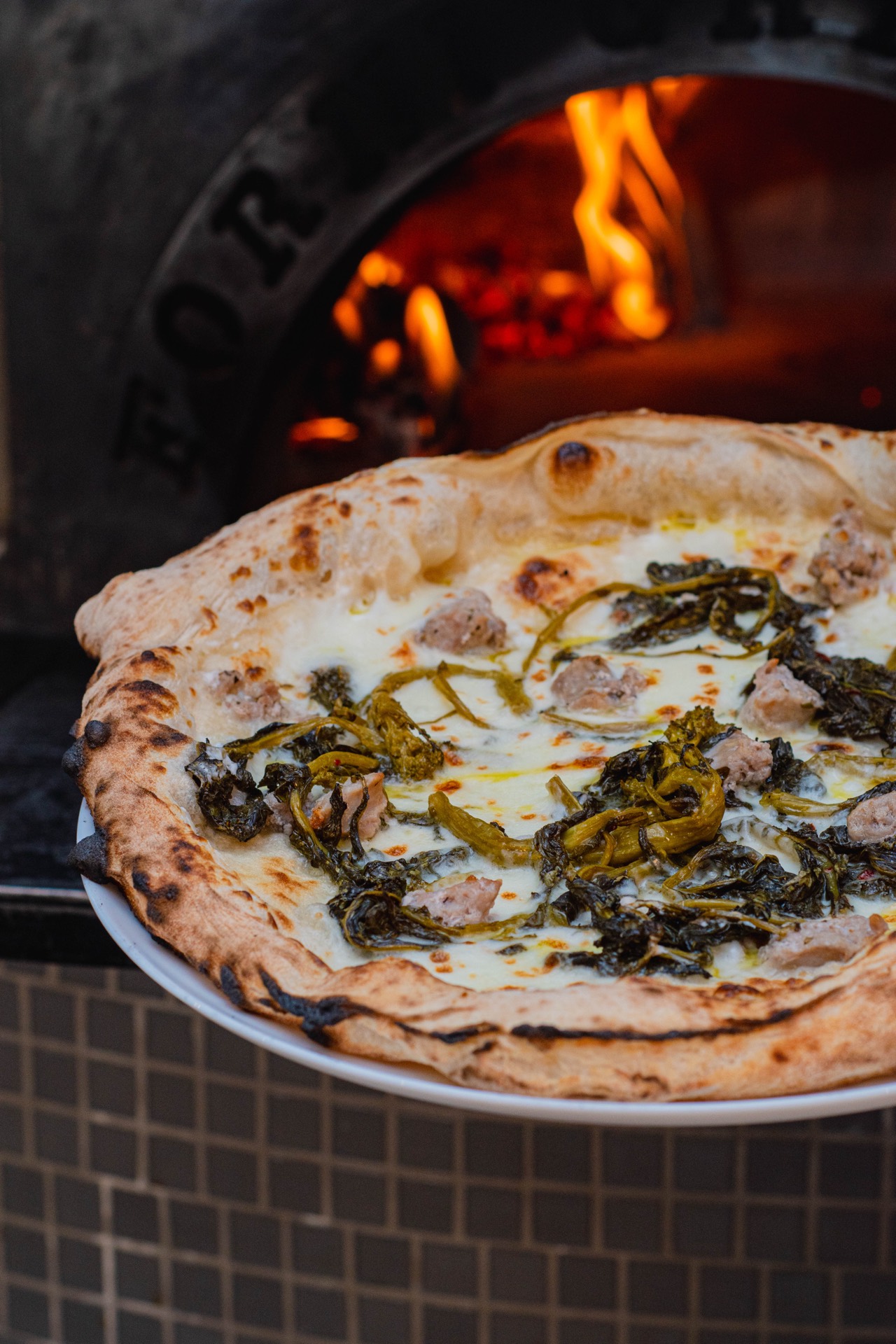
The hours, the price, the address and today’s special have to be written on the page, next to the photo. A beautiful shot of the blackboard, or the whole menu as one JPG, leaves those facts silent. On a phone, people pinch to zoom and give up. Google may not read the number. Next to a photo of a pizza like the ones that come out of the oven at Fame, the paragraph names the dish, says what is on it, gives today’s price and flags an allergen if the kitchen needs a warning. That price is the one on the current menu. If the dish runs out during service, the text changes in that same service, the way you cross it off the board.
The page has to be usable as soon as it loads. A newsletter or cookie banner covering the menu, before anyone can read it or book, gets in the way. The person who writes the menu is someone who has been on the pass, not a generic line about “come and enjoy an evening”. Two or three concrete details, how the dough is handled, which day you go to the market, whether the terrace closes when it rains, are worth more than a paragraph of adjectives. If a blog post is signed, that name is a real person at the venue and the link goes to a short bio. An invented chef, with a stock photo and years of craft nobody can check, is a deception.
If the digital menu is still a PDF or a photo, we can turn it into real words and real pictures with a digital menu for restaurants. A quote with no commitment, with your menu in front of us.
Breakfast at Botequim. On the website, the dish is named and priced next to the photo.
7. The photo next to the dish it belongs to
Every photo that carries information gets one sentence of alternative text, written for this page: “A Fame pizza coming out of the oven”. The file name, IMG_1234, or a list of loose words, describes nothing. If the image is decoration and the text beside it already tells the story, the alt can be empty. Put the photo next to the paragraph about that dish, not in a generic block reused on every URL. On the Google listing, upload the front, the room, the team, the logo and the dishes that are on the menu this week. A few recent photos of the room help someone who is about to visit more than an album from two years ago. Coordinates buried in the file do not change how Google sees you.
The photo is of the dish that leaves your kitchen. A generated image of a pizza you never baked is not the venue’s pizza, and on a product page that image would need to be marked as made by a model. In a restaurant, what fills a table is a photo from this week’s pass, like the ones we shoot at Barra Amelia. The person who uploads photos to the listing can be the same manager who updates the hours. If you cannot stop service for a shoot, that is a separate conversation.
If the dishes on the website and on the listing do not look like what lands on the table, Cristina can come to the venue through our food photography service. We have spent years on the floor, and we will send a no-commitment quote.
The pass at Barra Amelia. The same photo can sit on the menu, next to the name of the dish.
8. Links that say where they go
The words of a link say what is on the other side. “See the seasonal menu” goes to the menu. “How to find the venue” goes to the map and the street. “Click here”, “more info” or a bare URL make people guess. Google follows real links, the ones that are an <a href> with an address. A button that only works through a script, with no link underneath, can leave that page unseen. The homepage links to the menu, the hours and the booking. The menu links back to how to book.
If you pay for a link on another site, that link uses rel="sponsored". If a guest dropped the link in a comment, rel="ugc". If you do not trust the destination, nofollow. That way their site does not drag you, and you do not lend them your reputation. When you state something you already explain on another page of yours, link to it. “We have a terrace” can point at the line on the homepage that says until what time you serve outside.
9. Reviews from people who actually sat down
Reviews are written by people who ate. Ask every table that has paid, with a QR on the bill or on the table, not only the ones who already told you they loved it. Choosing who you invite based on the score you think they will give breaks Google’s policies. Buying reviews, or writing them yourselves from a staff phone, does too. Google removes reviews that break the rules, including some five-star ones. A made-up score on the website, with stars the page does not show, does not belong in the text or in hidden data.
Answered reviews show what the house is like. Whoever replies, the manager or whoever runs the floor, mentions the dish the guest named and, if something failed, says what you changed on the next service. A copied “thanks for visiting, hope to see you soon” on every review sounds like a mailbox. The questions that used to live in the listing’s Q&A are disappearing from there. The useful answer, how to book the terrace, whether you really do gluten-free, is written on the website, where anyone can read it without opening the app.
If you would rather we line up the website, the listing and the menu, Carlota can look at that as part of the marketing agency work. We will tell you what we would do for your venue, and the quote has no commitment.
10. If a chat helps you write
Using a chat to organise your thoughts, or to draft the menu in English, is fine. Publishing that draft with a light edit and calling it your own writing is not. The model predicts words. It has not stood on your pass and it does not know today’s price or whether the dessert has nuts. Before you publish, someone from the kitchen reads every dish, every price, every allergen and every hour, out loud, with the paper menu beside them.
If a tool wrote a substantial part of the text, one line is enough where it makes sense: a chat prepared it and the floor team checked it. Signing it with an expert who does not work there hides the process and misleads the person booking. What is worth adding is the detail only you have. The day the menu changes after the market. The table you cannot book because it belongs to the regular at the bar. A model will not guess that, and it is what separates your page from twenty others that say the same thing.
The same rule applies to pages. A chat can help you write the menu for your own dining room. Do not ask it for thirty versions, one per town, changing only the place name. If the page is no use to someone who arrives directly, without having searched for anything, do not publish it.
11. When the search answers with a summary
Generated answers in Google Search, the summaries and the mode where you ask a question, use the same quality systems as the rest of Search. It is not a separate job, and you do not need to rewrite the site in a special style for a machine, or slice every paragraph, or stuff in every long way of asking the same thing. Those systems can use one section of a longer page. There is no ideal length. An extra file made only so that “an AI can read the site” does not change how Google Search treats you.
What stands out, when many sources are compared, is your own detail. “Seven tips for choosing a restaurant” could have been written by anyone. “The terrace closes when it rains and the last kitchen seating is at eleven” can only be written by you, and it has to be true. Buying mentions so the name shows up in an automatic answer is not a path. Neither is a data block added only in the hope of being quoted: structured data is not the requirement for those summaries.
To be eligible to be quoted, the page has to be allowed in the index and allowed to show a snippet. A noindex or a nosnippet on the menu blocks that. Meeting the requirement still does not guarantee a place in the summary. Whoever has Search Console can check whether the site is included in the generative features. If you do not have access, ask whoever looks after the site to look. It is not a lever for positions.
12. A data block that repeats what a guest can already read
Alongside the visible text, the homepage can carry a JSON-LD block, inside a <script type="application/ld+json">, that tells Google what kind of place you are. The type that fits is the one a guest would recognise: Restaurant, CafeOrCoffeeShop or BarOrPub. The “pizzeria” category on your Google listing is a different list, the one in the app. On the website, the block copies what is already readable: name, address, phone, hours, a link to the menu and, if the page says so, the kind of cooking. If a fact is not written for the guest, it does not go in the block. Fewer fields, accurate ones, beat a long invented block.
Do not add an average score or a review count the page does not show. Do not add a block of frequently asked questions at the bottom of the menu to chase a box in Google: that box is no longer shown. If a guest really asks how to book the terrace, the answer belongs in the text of the page. Marking the dough method as a tutorial does not earn a special result either. Whoever builds the block checks it in the rich results test. A test with no errors does not mean the box will appear. The guest still has to see the hours on the page, not only inside the code.
A sheet to line up the listing and the website
You can copy this into your notes and fill it in with the Google app and the website open. The day a detail changes, it changes in both places.
GOOGLE LISTING
Name as it appears on the sign and on invoices:
Primary category (the most specific one that is true):
Extra categories (only if they are also true):
Full address:
Phone the shift actually answers:
Hours, Monday to Sunday:
Next bank holiday (special hours already loaded):
Website link (the page with the street, hours and booking):
Menu link:
Booking link:
Description (750 characters maximum, read aloud):
Real attributes (terrace, takeaway, booking, access):
Photos from this week (front, room, team, dishes on the menu):
Is there another pin on the same door? What you will do with it:
Person who updates the hours when service changes:

WEBSITE
Main address (https, with or without www, one only):
Homepage title:
Menu title:
First paragraph of the homepage (what you serve, the street, how to book):
Dishes with name, today’s price and allergens written out, not only in a photo:
Thank-you page or draft set to noindex:
Menu in another language: the two pages point at each other
Data block: only fields a guest can already read on the page
Who checks prices and allergens before publishing:
Who answers reviews this week:
Want us to set it up?
If service does not leave an hour to line up the listing, the menu and the words, we can look at it in the studio. See how we work as a marketing agency, or commission a digital menu so it stops being a photo. If the weekly work is on Instagram, the other course is Manage your business Instagram.
Fewercopies,moretables.
Shall we talk about how people find you?
Tell us what kind of venue you have and we will look at the listing, the website and the menu with you.